The SHIFT platform
SHIFT / LATTICEPOINT SYSTEMS

The whole load.
The whole workflow.

Purpose-built for materials hauling. Connect the assignment, the driver, the ticket, and the office around the work being done.

Four connected parts

A clearer handoff.
At every step.

A load does not end at delivery. The record still has a job to do.

01 / DISPATCH

Start with a clear assignment.

Dispatch loads within a workflow built for moving construction materials. Connect the truck assignment to the pickup and delivery work that follows.

  • Materials hauling as the starting point
  • The load and its next handoff together
  • A connected path from the desk to the field
02 / DRIVER EXPERIENCE

Keep the field part simple.
A driver-first approach keeps the load workflow close to where the work happens. Help your team move from paper-dependent processes to organized digital records.

  • Trip check-in and direct driver chat
  • Problem reports and ticket attachments in context
  • Driver adoption as part of the rollout conversation
03 / DIGITAL TICKETS

Keep proof with the load.

Replace paper tickets with verified digital records. Track deliveries and keep ticket information organized as a load moves from pickup to final delivery.

  • Digital load records in place of loose paperwork
  • A record connected to the hauling workflow
  • Ticket organization that continues beyond delivery
04 / INVOICING WORKFLOW

Give the office the full story.

Connect completed hauling work to invoicing. Give the office a more organized starting point for reviewing the records behind the bill.

  • The tickets behind the work in one flow
  • Dispatch-to-invoicing continuity
  • Accounting handoff requirements discussed in your demo
Configurable monitoring concept

Your rules.
The right flag.

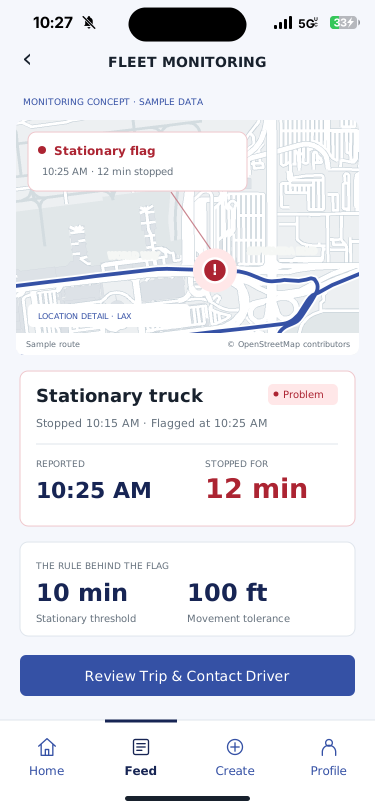
Choose the trucks and conditions you want to watch. A truck sitting in the same place for 10 minutes can be flagged for dispatcher review.

  • Set the parametersChoose the stationary time limit, movement tolerance, and trucks to monitor.
  • Allow for the jobExclude expected loading, unloading, and scheduled breaks from the rule.
  • Check the contextReview the trip or reported problem, then chat directly with the driver.
View the alert screens

Monitoring concept. Location-data integration and rollout scope are confirmed for your fleet.

Try an example ruleInteractive concept
Sample truck 21 · Active trip12 minutes stationary

Within a 100-foot movement zone · Fictional location data

10 minutes

Adjust the time limit to see when the sample truck would be flagged.

Flag for review

Truck 21 has reached your 10-minute stationary limit.

A flag starts a review. Check the job context and ask the driver what is happening.

Explore direct driver chat
Explore the SHIFT interface

See the work
through the app.

Explore trip creation, direct driver chat, statistics, tickets, and problem reports. See configurable monitoring concepts alongside the recreated app designs.

Dispatch & fleet

Give the assignment a clear starting point.

Truck selection, driver assignment, and trip creation set up the handoff. Explore the job form, trip list, and equipment details below.

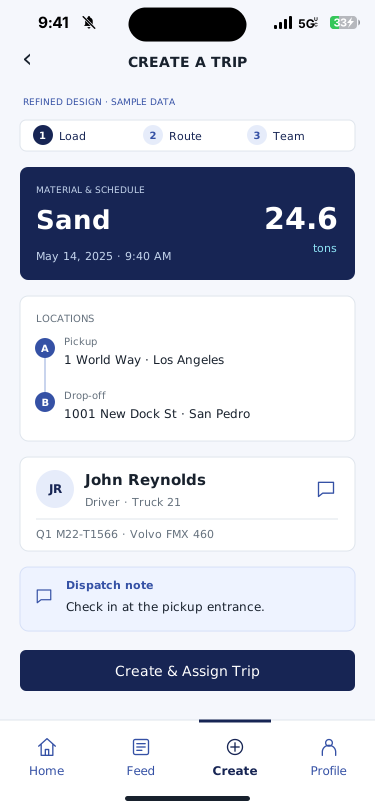
Refined concept · sample data: A guided load, route, and team layout brings the assignment together before dispatch.
01 / DISPATCH & FLEETCreate and assign a trip

A guided load, route, and team layout brings the assignment together before dispatch.

Refined concept · sample dataView larger
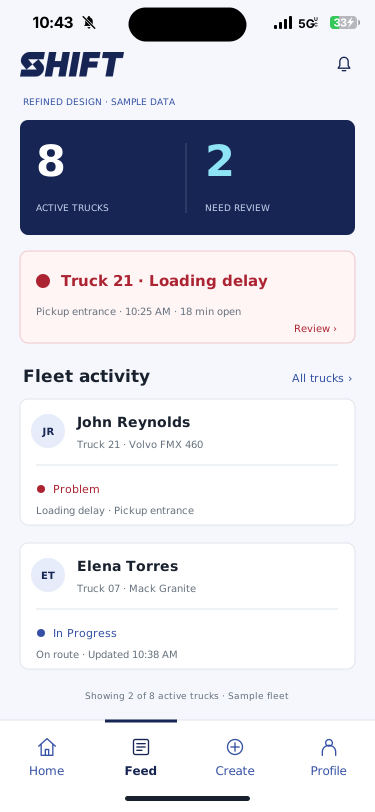
Refined concept · sample data: An at-a-glance fleet summary brings a flagged truck, the delay duration, and driver activity forward.
02 / DISPATCH & FLEETPut the exception in focus

An at-a-glance fleet summary brings a flagged truck, the delay duration, and driver activity forward.

Refined concept · sample dataView larger
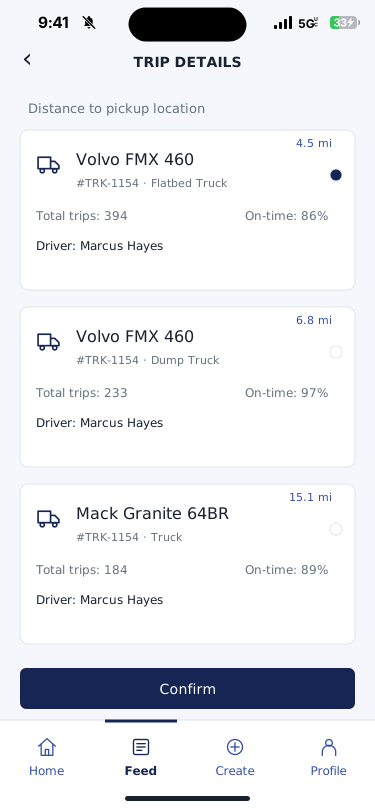
Recreated SHIFT interface: Truck choices with pickup distance and assignment information.
03 / DISPATCH & FLEETChoose the truck

Truck choices with pickup distance and assignment information.

View larger
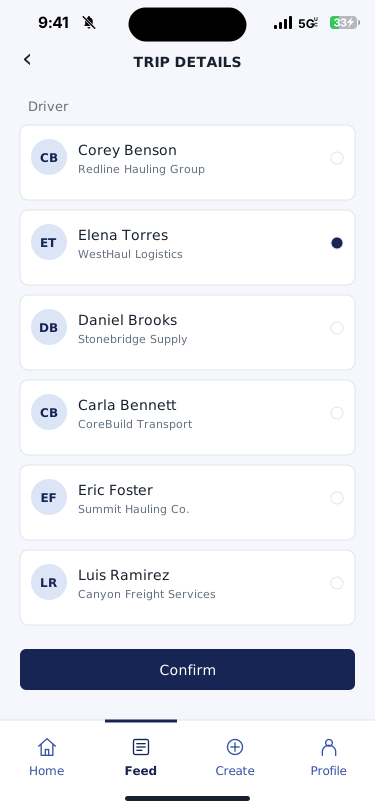
Recreated SHIFT interface: Driver selection and confirmation in the trip setup flow.
04 / DISPATCH & FLEETAssign the driver

Driver selection and confirmation in the trip setup flow.

View larger
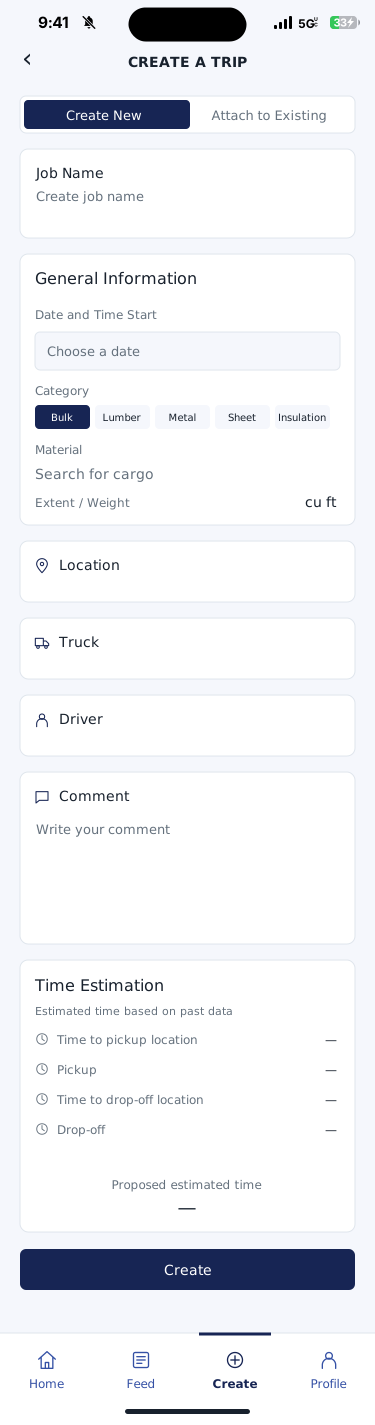
Recreated SHIFT interface: Job name, cargo, location, driver, truck, comments, and timing in the trip form.
05 / DISPATCH & FLEETCreate the trip

Job name, cargo, location, driver, truck, comments, and timing in the trip form.

Scroll to see the full recordView larger
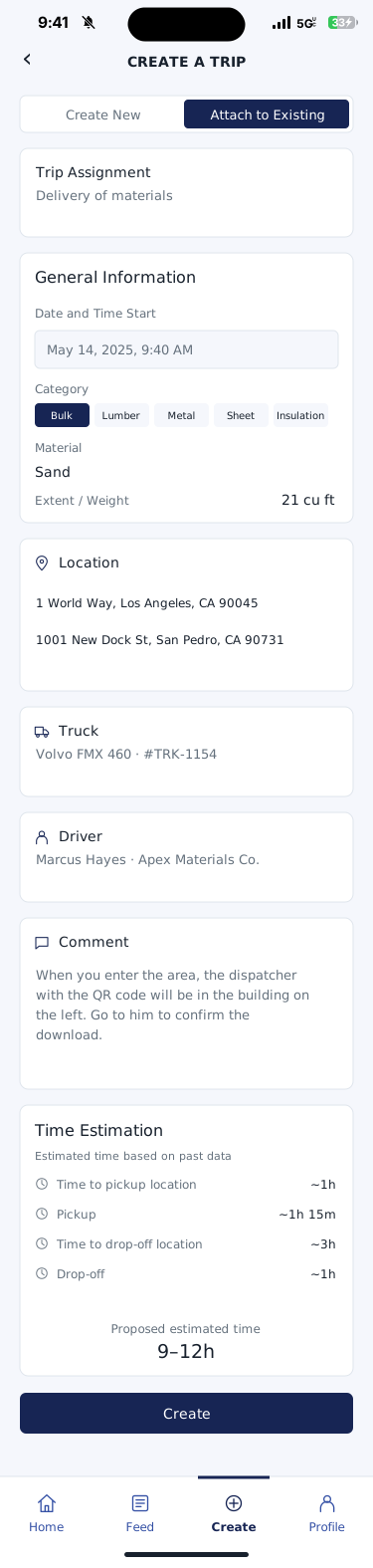
Recreated SHIFT interface: Attach a trip to an existing assignment with its load and location details.
06 / DISPATCH & FLEETBuild on the existing job

Attach a trip to an existing assignment with its load and location details.

Scroll to see the full recordView larger
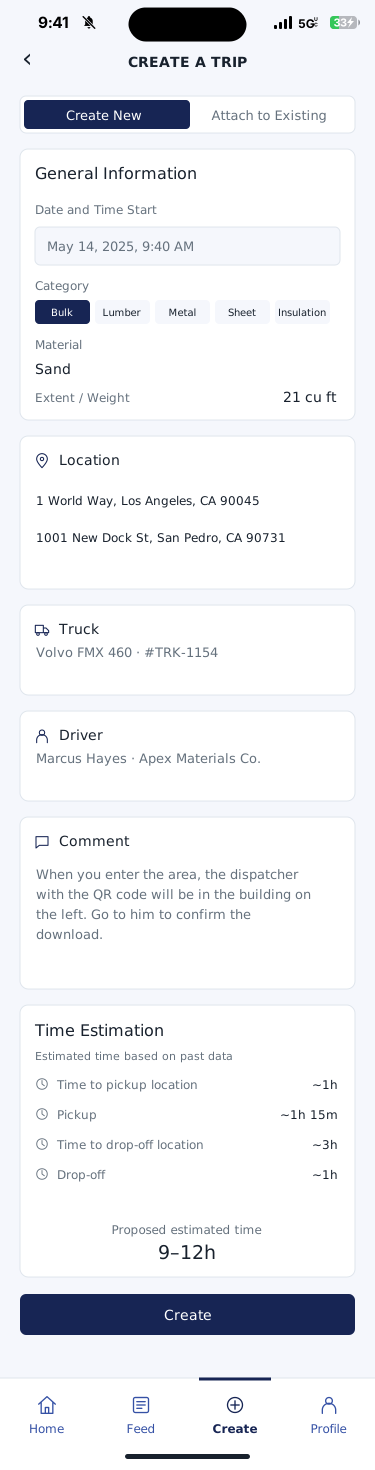
Recreated SHIFT interface: A completed trip form with material, quantity, locations, equipment, and proposed timing.
07 / DISPATCH & FLEETPut the load details together

A completed trip form with material, quantity, locations, equipment, and proposed timing.

Scroll to see the full recordView larger
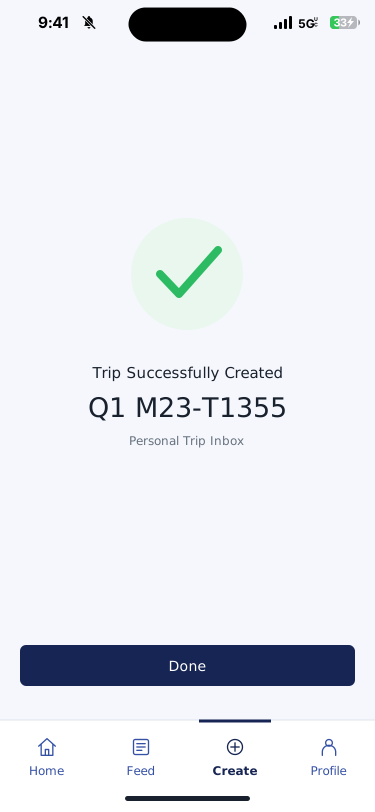
Recreated SHIFT interface: The trip creation confirmation and its reference number.
08 / DISPATCH & FLEETTrip ready

The trip creation confirmation and its reference number.

View larger
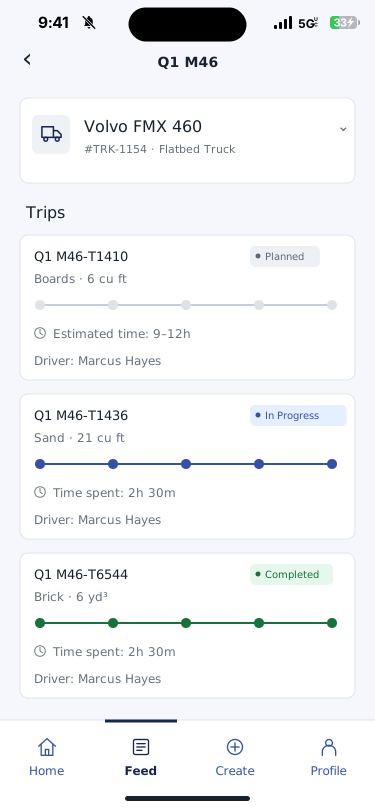
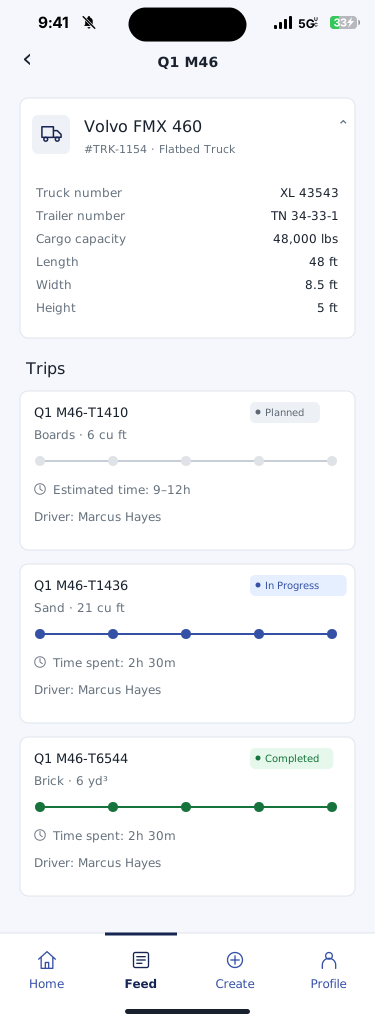
Recreated SHIFT interface: Planned, in-progress, and completed trips in one vehicle view.
09 / DISPATCH & FLEETSee the trip list

Planned, in-progress, and completed trips in one vehicle view.

View larger
Recreated SHIFT interface: Truck and trailer details above the vehicle’s trip list.
10 / DISPATCH & FLEETKnow the equipment

Truck and trailer details above the vehicle’s trip list.

Scroll to see the full recordView larger
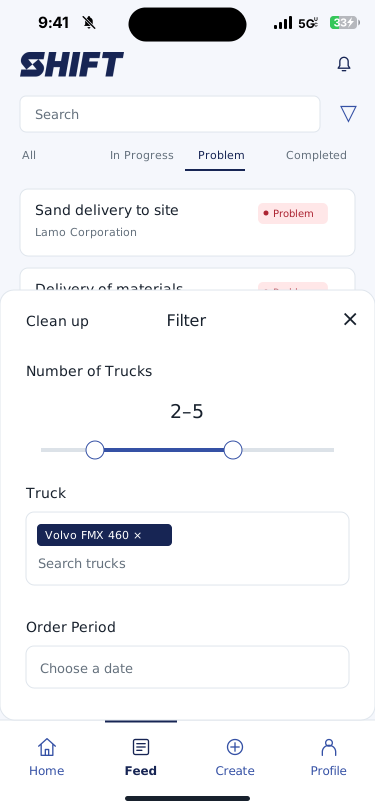
Recreated SHIFT interface: Filters for truck selection and order period.
11 / DISPATCH & FLEETFocus the fleet view

Filters for truck selection and order period.

View larger
Driver workflow

Follow the load, one step at a time.

The driver screens show the availability check-in, route, pickup check-in, delivery entries, and a clear completion step.

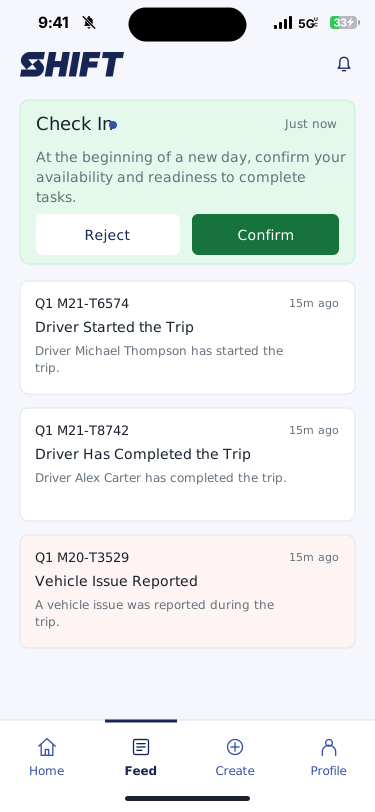
Recreated SHIFT interface: The check-in prompt and trip activity feed in the driver interface.
01 / DRIVER WORKFLOWStart with driver availability

The check-in prompt and trip activity feed in the driver interface.

View larger
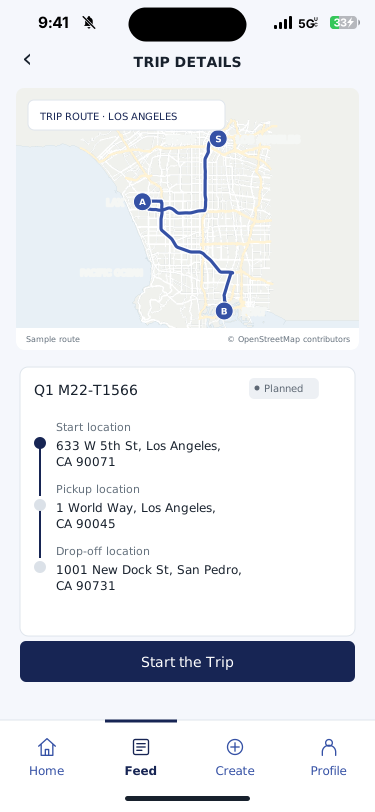
Recreated SHIFT interface: The planned route and the driver’s start-trip action.
02 / DRIVER WORKFLOWStart the trip

The planned route and the driver’s start-trip action.

Map © OpenStreetMap contributorsView larger
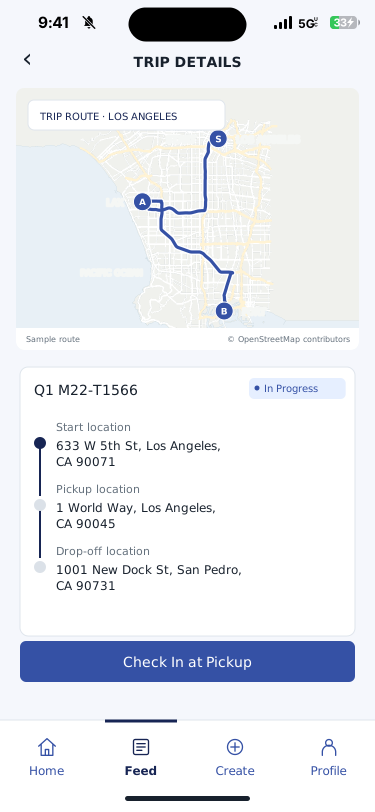
Recreated SHIFT interface: The in-progress trip with its map and pickup details.
03 / DRIVER WORKFLOWFollow the route

The in-progress trip with its map and pickup details.

Map © OpenStreetMap contributorsView larger
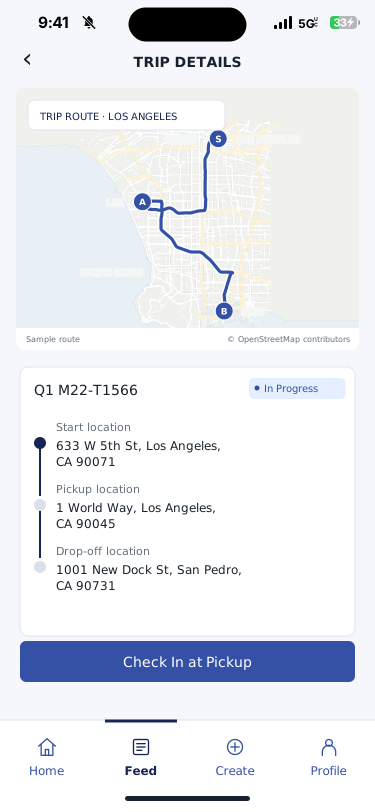
Recreated SHIFT interface: The pickup check-in step in the driver workflow.
04 / DRIVER WORKFLOWCheck in at pickup

The pickup check-in step in the driver workflow.

Map © OpenStreetMap contributorsView larger
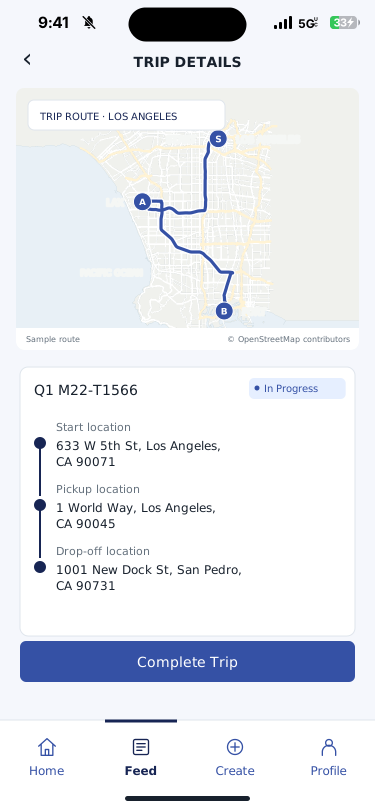
Recreated SHIFT interface: Pickup and drop-off entries followed by the completion action.
05 / DRIVER WORKFLOWComplete the trip

Pickup and drop-off entries followed by the completion action.

Map © OpenStreetMap contributorsView larger
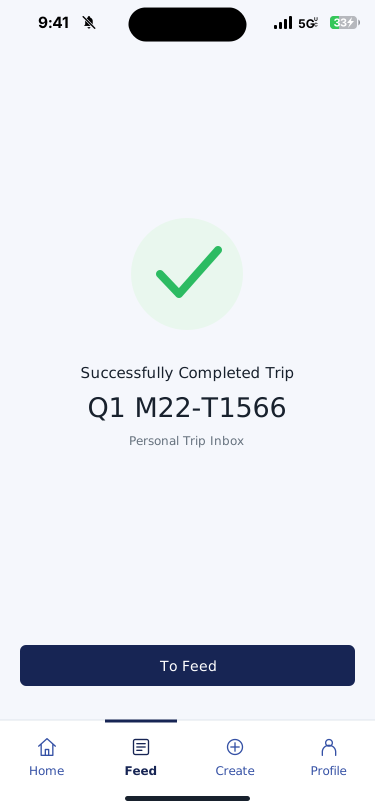
Recreated SHIFT interface: Trip completion confirmation with the trip reference.
06 / DRIVER WORKFLOWCompletion recorded

Trip completion confirmation with the trip reference.

View larger
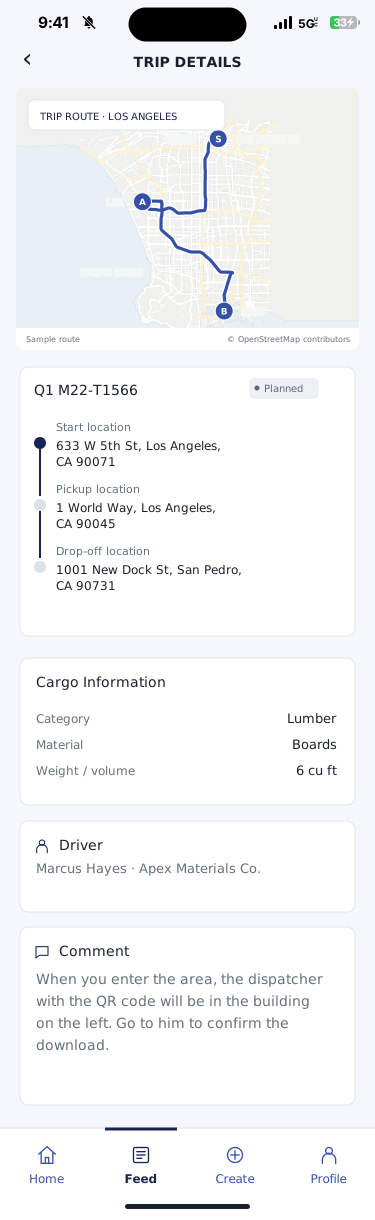
Recreated SHIFT interface: Route, material, driver, and job comments in the trip details.
07 / DRIVER WORKFLOWReview the assignment

Route, material, driver, and job comments in the trip details.

Map © OpenStreetMap contributorsScroll to see the full recordView larger
Load & ticket

The record stays close to the work.

The trip details bring route entries, material information, ticket attachments, and job comments into the same view.

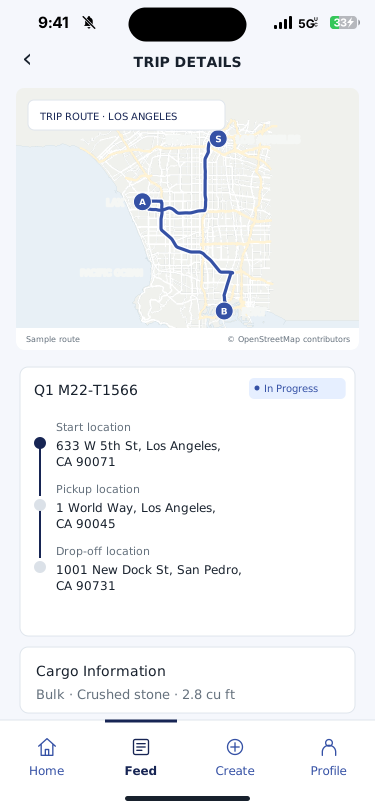
Recreated SHIFT interface: The trip’s route entries and cargo information.
01 / LOAD & TICKETKeep the load in context

The trip’s route entries and cargo information.

Map © OpenStreetMap contributorsView larger
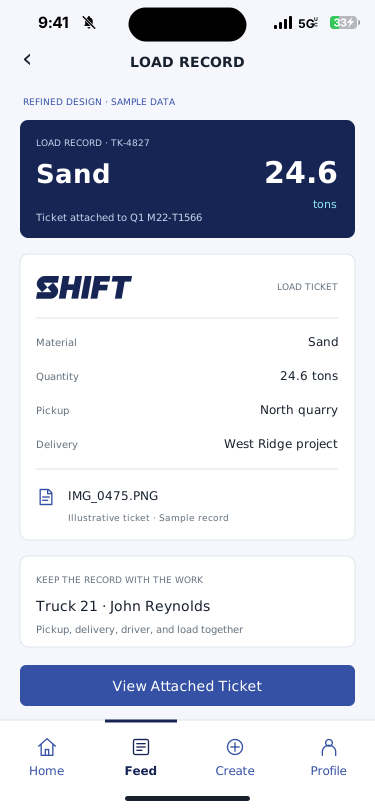
Refined concept · sample data: A legible ticket preview puts material, quantity, locations, truck, and driver together.
02 / LOAD & TICKETKeep proof with the load

A legible ticket preview puts material, quantity, locations, truck, and driver together.

Refined concept · sample dataView larger
Problems & updates

Make the exception visible.

A driver can describe a problem in the trip flow. The matching activity, history, and trip views keep that report in context.

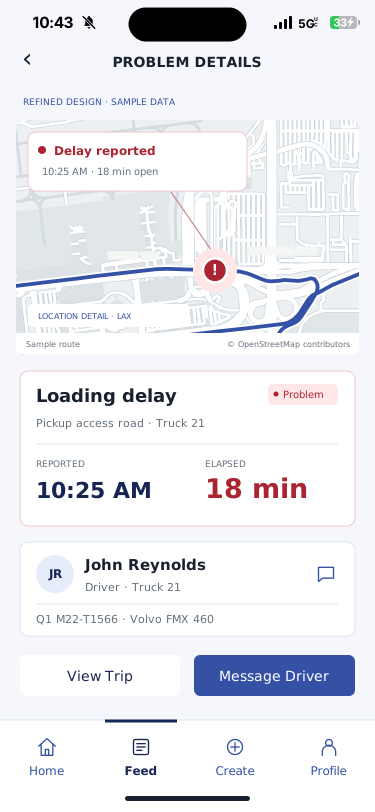
Refined concept · sample data: A red incident marker identifies the location. The report time and elapsed delay make the problem clear.
01 / PROBLEMS & UPDATESKnow where, when, and how long

A red incident marker identifies the location. The report time and elapsed delay make the problem clear.

Refined concept · sample dataMap © OpenStreetMap contributorsView larger
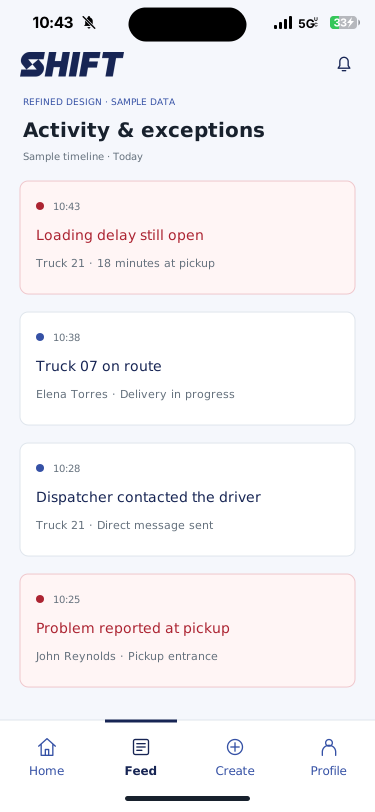
Refined concept · sample data: Time-stamped trip updates and a reported problem show the sequence of the handoff.
02 / PROBLEMS & UPDATESFollow the event as it unfolds

Time-stamped trip updates and a reported problem show the sequence of the handoff.

Refined concept · sample dataView larger
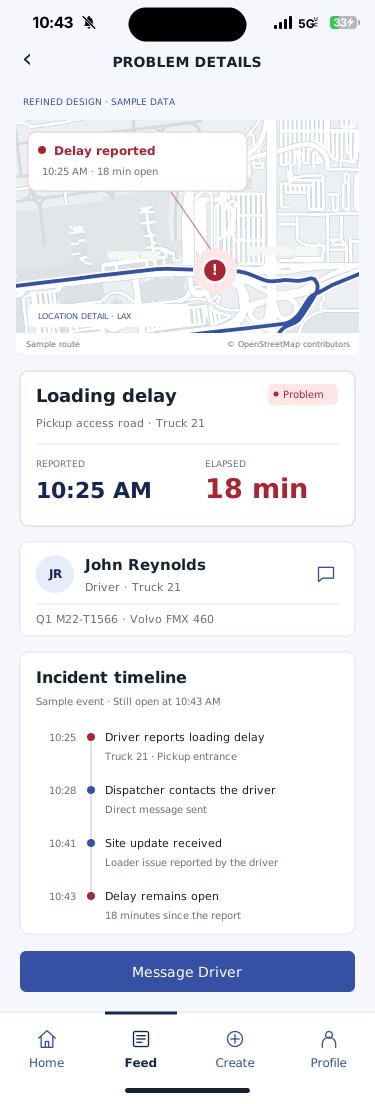
Refined concept · sample data: The incident location, report time, elapsed duration, driver, and response timeline in one view.
03 / PROBLEMS & UPDATESSee the story behind the exception

The incident location, report time, elapsed duration, driver, and response timeline in one view.

Refined concept · sample dataMap © OpenStreetMap contributorsScroll to see the full recordView larger
Recreated SHIFT interface: Driver and truck details, trip statuses, and the sequence of trip activity.
04 / PROBLEMS & UPDATESSee the trip history

Driver and truck details, trip statuses, and the sequence of trip activity.

Scroll to see the full recordView larger
Driver chat

Talk directly with the person in the truck.

Use a direct driver conversation to clarify the pickup, ask about a delay, and share the ticket or photo behind the update. Messages shown here are illustrative.

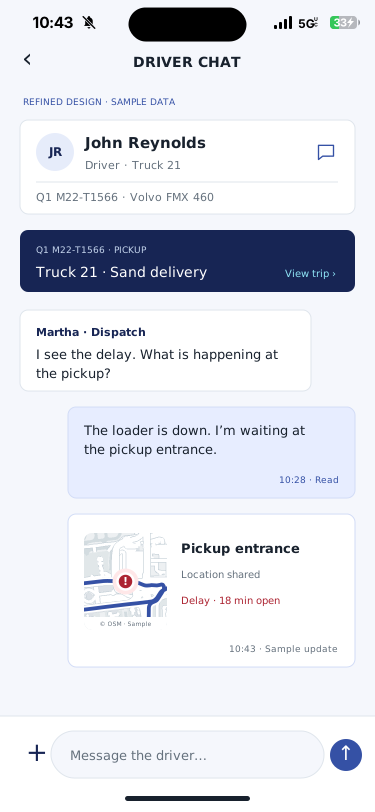
Refined concept · sample data: A driver conversation with the related trip, reported delay, and shared location in view.
01 / DRIVER CHATChat with the context in view

A driver conversation with the related trip, reported delay, and shared location in view.

Refined concept · sample dataMap © OpenStreetMap contributorsView larger
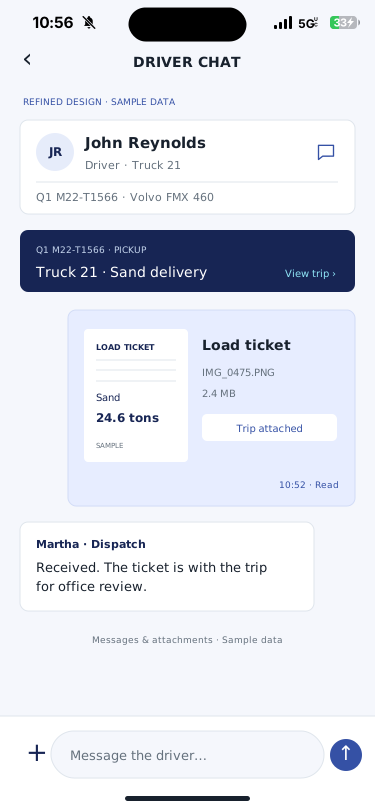
Refined concept · sample data: A readable ticket preview, attachment details, and the driver’s trip in one conversation.
02 / DRIVER CHATSee the ticket inside the conversation

A readable ticket preview, attachment details, and the driver’s trip in one conversation.

Refined concept · sample dataView larger
Statistics & history

Follow the numbers behind the trip.

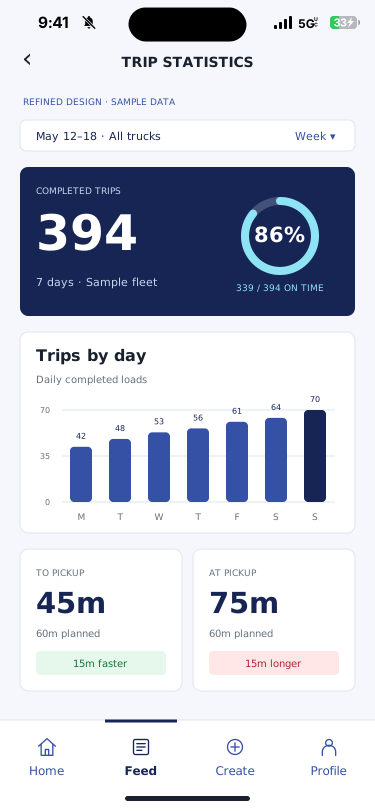
Explore trip count, on-time history, estimated versus recorded stage times, and the sequence of trip activity. Summary layouts and example figures are illustrative.

Refined concept · sample data: Weekly trip totals, daily throughput, on-time performance, and pickup-stage comparisons.
01 / STATISTICS & HISTORYLet the numbers tell the story

Weekly trip totals, daily throughput, on-time performance, and pickup-stage comparisons.

Refined concept · sample dataView larger
Recreated SHIFT interface: Estimated and recorded trip stages, the key contact, and a chronological activity history.
02 / STATISTICS & HISTORYCompare the planned and recorded time

Estimated and recorded trip stages, the key contact, and a chronological activity history.

Scroll to see the full recordView larger
Alert concepts

Choose what deserves attention.

Configurable monitoring concept: choose which trucks to watch, how long a stationary period can last, and what expected stops to exclude. Location data and rollout scope must be confirmed for your fleet.

Configurable monitoring concept: Monitoring concept: choose a stationary threshold, movement zone, active-trip scope, and expected-stop exclusions.
01 / ALERT CONCEPTSSet the parameters that matter

Monitoring concept: choose a stationary threshold, movement zone, active-trip scope, and expected-stop exclusions.

Configurable monitoring conceptView larger
Monitoring concept · sample data: Monitoring concept: mark where the truck stopped, when the rule flagged it, and how long it has been stationary.
02 / ALERT CONCEPTSSee the stop behind the flag

Monitoring concept: mark where the truck stopped, when the rule flagged it, and how long it has been stationary.

Monitoring concept · sample dataMap © OpenStreetMap contributorsView larger
See the workflow

One load. One record.
Everyone in the loop.

Explore an example of the connected hauling workflow—from the dispatch desk to the driver and the office.

Dispatch overview

A sample day in the field

Interactive concept preview
Sample loads6across the workflow
In transit2
Completed2

Enable JavaScript to explore dispatch, driver, and ticket examples. This preview uses fictional data and illustrates the workflow.

Choose a workflow above, filter the example loads, or open a load card to follow its record. This is a concept preview with fictional data, not a live SHIFT account.

Explore the platform
Follow the record

The load moves.
The information follows.

Explore the handoffs in the workflow, then bring a real example from your own operation to the demo.

Walk through your workflow
01Plan the load.

Bring the pickup, destination, material, and truck assignment into the dispatch workflow. Give the next handoff a clear starting point.

02Keep the driver in the loop.

Connect the assignment to the driver’s work in the field. A driver-first experience puts the hauling workflow where the load happens.

03Keep the ticket with the job.

Use verified digital records in place of paper tickets. Keep the information organized as the load moves from pickup to delivery.

04Bring the record back to the office.

Connect completed hauling records to the invoicing workflow. Review the tickets behind the work before closing the billing loop.

The economics of the handoff

Paper tickets take time.
Your trucks make it valuable.

Five minutes at pickup. Five at delivery. At $150 an hour, that’s $25 of truck-time capacity tied up in paperwork on a round trip.

Example assumptions. The time you recover depends on the workflow you replace and the time digital tickets still take.

Calculate your opportunity
The round-trip example
5minPickup ticket
+
5minDelivery ticket
=
10minPaper handling
$25in truck time per round trip
at a $150 hourly rate
And the office?

Model the share of a $70,000 role spent collecting tickets, checking records, and working through invoices.

Explore truck & office time
Move your operation forward

See SHIFT through
your team’s eyes.

Bring a dispatch scenario, a ticket, or a billing challenge. We’ll start with the way your operation actually works.

Let’s talk SHIFT
Illustrative load record