
Calls. Texts. Moving targets.
Truck assignments and load details can get scattered across conversations. A connected dispatch workflow gives the next step a clearer handoff.

Bring dispatch, drivers, digital tickets, and billing into one connected workflow. SHIFT helps your team keep materials moving—and the records moving with them.

When each part of the job lives in a different place, the office has to put the story back together.
Truck assignments and load details can get scattered across conversations. A connected dispatch workflow gives the next step a clearer handoff.
Paper gets separated from the work it describes. Digital load records keep the hauling information together from pickup to final delivery.
Before an invoice goes out, someone has to find the tickets behind it. SHIFT connects the hauling flow to the records the office needs.
Know where a problem happened, when it was reported, and how long it has been open. Put that context beside the trip, the numbers, and the driver conversation.
Explore all app previews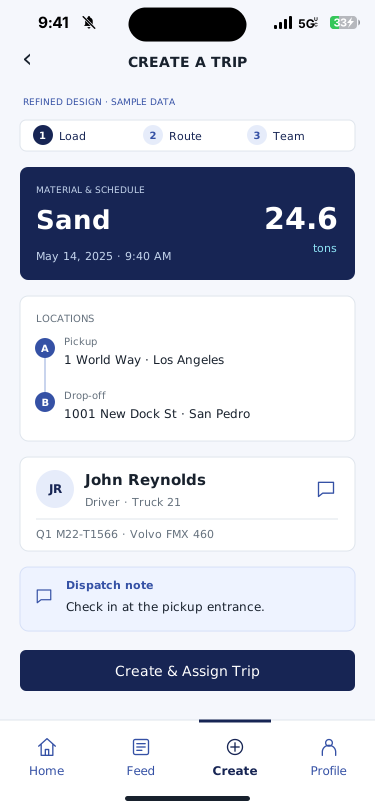
A guided load, route, and team layout brings the assignment together before dispatch.
Refined concept · sample dataView larger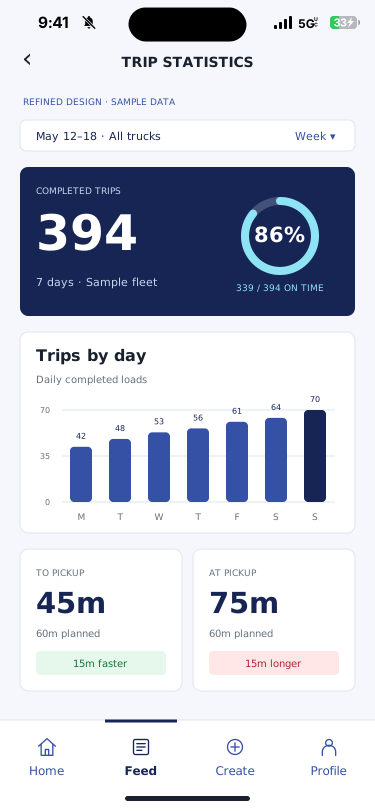
Weekly trip totals, daily throughput, on-time performance, and pickup-stage comparisons.
Refined concept · sample dataView larger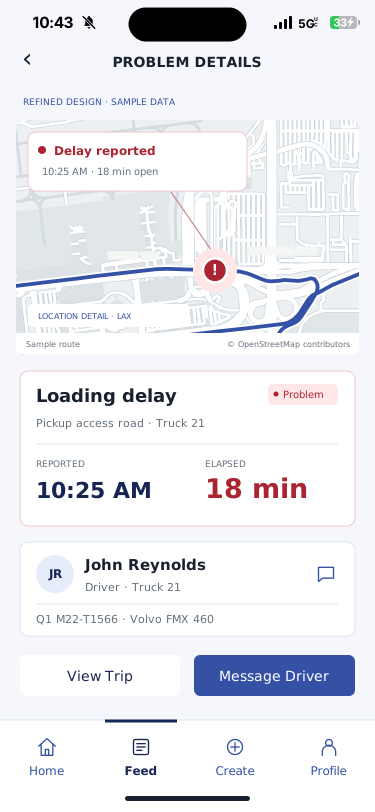
A red incident marker identifies the location. The report time and elapsed delay make the problem clear.
Refined concept · sample dataMap © OpenStreetMap contributorsView larger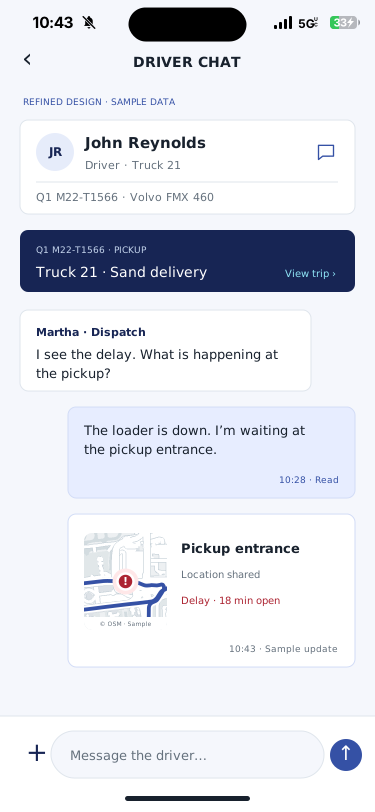
A driver conversation with the related trip, reported delay, and shared location in view.
Refined concept · sample dataMap © OpenStreetMap contributorsView larger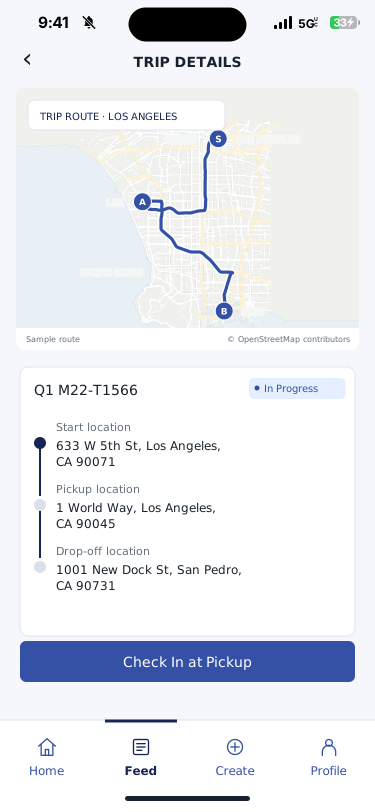
The pickup check-in step in the driver workflow.
Map © OpenStreetMap contributorsView larger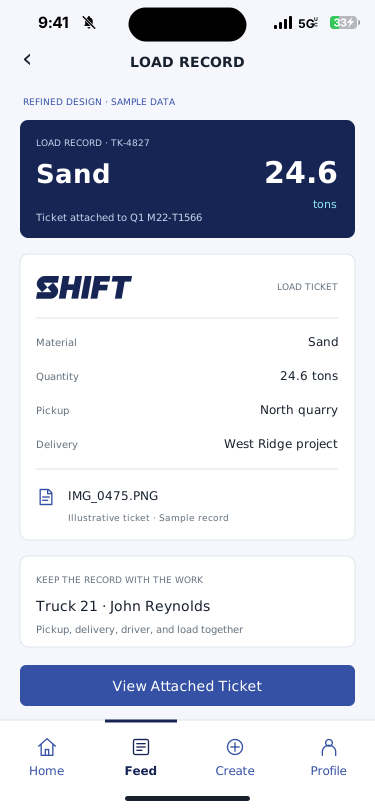
A legible ticket preview puts material, quantity, locations, truck, and driver together.
Refined concept · sample dataView largerChoose the trucks and conditions you want to watch. A truck sitting in the same place for 10 minutes can be flagged for dispatcher review.
Monitoring concept. Location-data integration and rollout scope are confirmed for your fleet.
Within a 100-foot movement zone · Fictional location data
Adjust the time limit to see when the sample truck would be flagged.
Truck 21 has reached your 10-minute stationary limit.
A flag starts a review. Check the job context and ask the driver what is happening.
Explore direct driver chatExplore an example of the connected hauling workflow—from the dispatch desk to the driver and the office.
Enable JavaScript to explore dispatch, driver, and ticket examples. This preview uses fictional data and illustrates the workflow.
Choose a workflow above, filter the example loads, or open a load card to follow its record. This is a concept preview with fictional data, not a live SHIFT account.
Explore the platformSHIFT is built specifically around materials hauling. The workflow follows the load across the people doing the work.
Get the full pictureBring the pickup, destination, material, and truck assignment into the dispatch workflow. Give the next handoff a clear starting point.
Connect the assignment to the driver’s work in the field. A driver-first experience puts the hauling workflow where the load happens.
Use verified digital records in place of paper tickets. Keep the information organized as the load moves from pickup to delivery.
Connect completed hauling records to the invoicing workflow. Review the tickets behind the work before closing the billing loop.
Designed around the work in the fieldFrom the pit to the project, SHIFT focuses on the details that matter in construction materials hauling.
SHIFT is built for materials hauling workflows. Hauling companies, materials suppliers, and construction teams can explore how dispatch, drivers, digital tickets, and invoicing fit their operation.
SHIFT focuses on the materials hauling workflow, connecting dispatch through digital tickets and invoicing. A demo is the best place to compare the specific workflow with the systems you use today.
SHIFT uses a per-truck pricing approach. Request a conversation to confirm your fleet scope, current rates, onboarding requirements, and what is included. Published dollar amounts are not yet shown on this site.
Yes. Bring your dispatch, ticketing, accounting, and billing process to the demo. The team can discuss compatibility and the implementation scope; specific integrations should be confirmed for your operation.
Let’s walk through your operation and see where SHIFT fits.